※ Label vs Selector 핵심 비교

구분 Label (이름표) Selector (검색기)
정의 리소스를 식별하기 위한 Key-Value 특정 Label을 가진 리소스를 선택하는 필터
위치 metadata.labels 항목에 작성 spec.selector 항목에 작성
사용 주체 Pod, Node (관리 대상) Service, Deployment, HPA (관리 주체)
비유 상품에 붙어 있는 바코드/태그 바코드를 찍어 물건을 분류하는 스캐너
역할 "나는 'A'라는 그룹 소속이다"라고 표시 "나는 'A' 그룹인 애들만 관리하겠다"라고 연결


1. k8s 환경 세팅

# k8s 에서 directory 생성
[root@k8s-master ~]#
mkdir -p /root/k8s-local-volume/1231

# k8s 대시보드에서 objec들 생성

dashboard 접속 > Namespace [모든 네임스페이스] > [+] 버튼 > [입력을 통해 생성] > yaml 파일 붙여넣기 > 업로드

- 아래는 yml.

더보기

apiVersion: v1
kind: Namespace
metadata:
  name: anotherclass-123
  labels:
    part-of: k8s-anotherclass
    managed-by: dashboard
---
apiVersion: v1
kind: PersistentVolume
metadata:
  name: api-tester-1231-files
  labels:
    part-of: k8s-anotherclass
    component: backend-server
    name: api-tester
    instance: api-tester-1231-files
    version: 1.0.0
    managed-by: dashboard
spec:
  capacity:
    storage: 2G
  volumeMode: Filesystem
  accessModes:
    - ReadWriteMany
  local:
    path: "/root/k8s-local-volume/1231"
  nodeAffinity:
    required:
      nodeSelectorTerms:
        - matchExpressions:
            - {key: kubernetes.io/hostname, operator: In, values: [k8s-master]}
---
apiVersion: v1
kind: PersistentVolumeClaim
metadata:
  namespace: anotherclass-123
  name: api-tester-1231-files
  labels:
    part-of: k8s-anotherclass
    component: backend-server
    name: api-tester
    instance: api-tester-1231
    version: 1.0.0
    managed-by: kubectl
spec:
  resources:
    requests:
      storage: 2G
  accessModes:
    - ReadWriteMany
  selector:
    matchLabels:
      part-of: k8s-anotherclass
      component: backend-server
      name: api-tester
      instance: api-tester-1231-files
---
apiVersion: v1
kind: ConfigMap
metadata:
  namespace: anotherclass-123
  name: api-tester-1231-properties
  labels:
    part-of: k8s-anotherclass
    component: backend-server
    name: api-tester
    instance: api-tester-1231
    version: 1.0.0
    managed-by: dashboard
data:
  spring_profiles_active: "dev"
  application_role: "ALL"
  postgresql_filepath: "/usr/src/myapp/datasource/postgresql-info.yaml"
---
apiVersion: v1
kind: Secret
metadata:
  namespace: anotherclass-123
  name: api-tester-1231-postgresql
  labels:
    part-of: k8s-anotherclass
    component: backend-server
    name: api-tester
    instance: api-tester-1231
    version: 1.0.0
    managed-by: dashboard
stringData:
  postgresql-info.yaml: |
    driver-class-name: "org.postgresql.Driver"
    url: "jdbc:postgresql://postgresql:5431"
    username: "dev"
    password: "dev123"
---
apiVersion: apps/v1
kind: Deployment
metadata:
  namespace: anotherclass-123
  name: api-tester-1231
  labels:
    part-of: k8s-anotherclass
    component: backend-server
    name: api-tester
    instance: api-tester-1231
    version: 1.0.0
    managed-by: dashboard
spec:
  selector:
    matchLabels:
      part-of: k8s-anotherclass
      component: backend-server
      name: api-tester
      instance: api-tester-1231
  replicas: 2
  strategy:
    type: RollingUpdate
  template:
    metadata:
      labels:
        part-of: k8s-anotherclass
        component: backend-server
        name: api-tester
        instance: api-tester-1231
        version: 1.0.0
    spec:
      nodeSelector:
        kubernetes.io/hostname: k8s-master
      containers:
        - name: api-tester-1231
          image: 1pro/api-tester:v1.0.0
          ports:
          - name: http
            containerPort: 8080
          envFrom:
            - configMapRef:
                name: api-tester-1231-properties
          startupProbe:
            httpGet:
              path: "/startup"
              port: 8080
            periodSeconds: 5
            failureThreshold: 36
          readinessProbe:
            httpGet:
              path: "/readiness"
              port: 8080
            periodSeconds: 10
            failureThreshold: 3
          livenessProbe:
            httpGet:
              path: "/liveness"
              port: 8080
            periodSeconds: 10
            failureThreshold: 3
          resources:
            requests:
              memory: "100Mi"
              cpu: "100m"
            limits:
              memory: "200Mi"
              cpu: "200m"
          volumeMounts:
            - name: files
              mountPath: /usr/src/myapp/files/dev
            - name: secret-datasource
              mountPath: /usr/src/myapp/datasource
      volumes:
        - name: files
          persistentVolumeClaim:
            claimName: api-tester-1231-files
        - name: secret-datasource
          secret:
            secretName: api-tester-1231-postgresql
---
apiVersion: v1
kind: Service
metadata:
  namespace: anotherclass-123
  name: api-tester-1231
  labels:
    part-of: k8s-anotherclass
    component: backend-server
    name: api-tester
    instance: api-tester-1231
    version: 1.0.0
    managed-by: dashboard
spec:
  selector:
    part-of: k8s-anotherclass
    component: backend-server
    name: api-tester
    instance: api-tester-1231
  ports:
    - port: 80
      targetPort: http
      nodePort: 31231
  type: NodePort
---
apiVersion: autoscaling/v2
kind: HorizontalPodAutoscaler
metadata:
  namespace: anotherclass-123
  name: api-tester-1231-default
  labels:
    part-of: k8s-anotherclass
    component: backend-server
    name: api-tester
    instance: api-tester-1231
    version: 1.0.0
    managed-by: dashboard
spec:
  scaleTargetRef:
    apiVersion: apps/v1
    kind: Deployment
    name: api-tester-1231
  minReplicas: 2
  maxReplicas: 4
  metrics:
    - type: Resource
      resource:
        name: cpu
        target:
          type: Utilization
          averageUtilization: 60
  behavior:
    scaleUp:
      stabilizationWindowSeconds: 120

object 삭제 script

[root@k8s-master ~]# kubectl delete ns anotherclass-123

[root@k8s-master ~]# kubectl delete pv api-tester-1231-files


2. Obejct
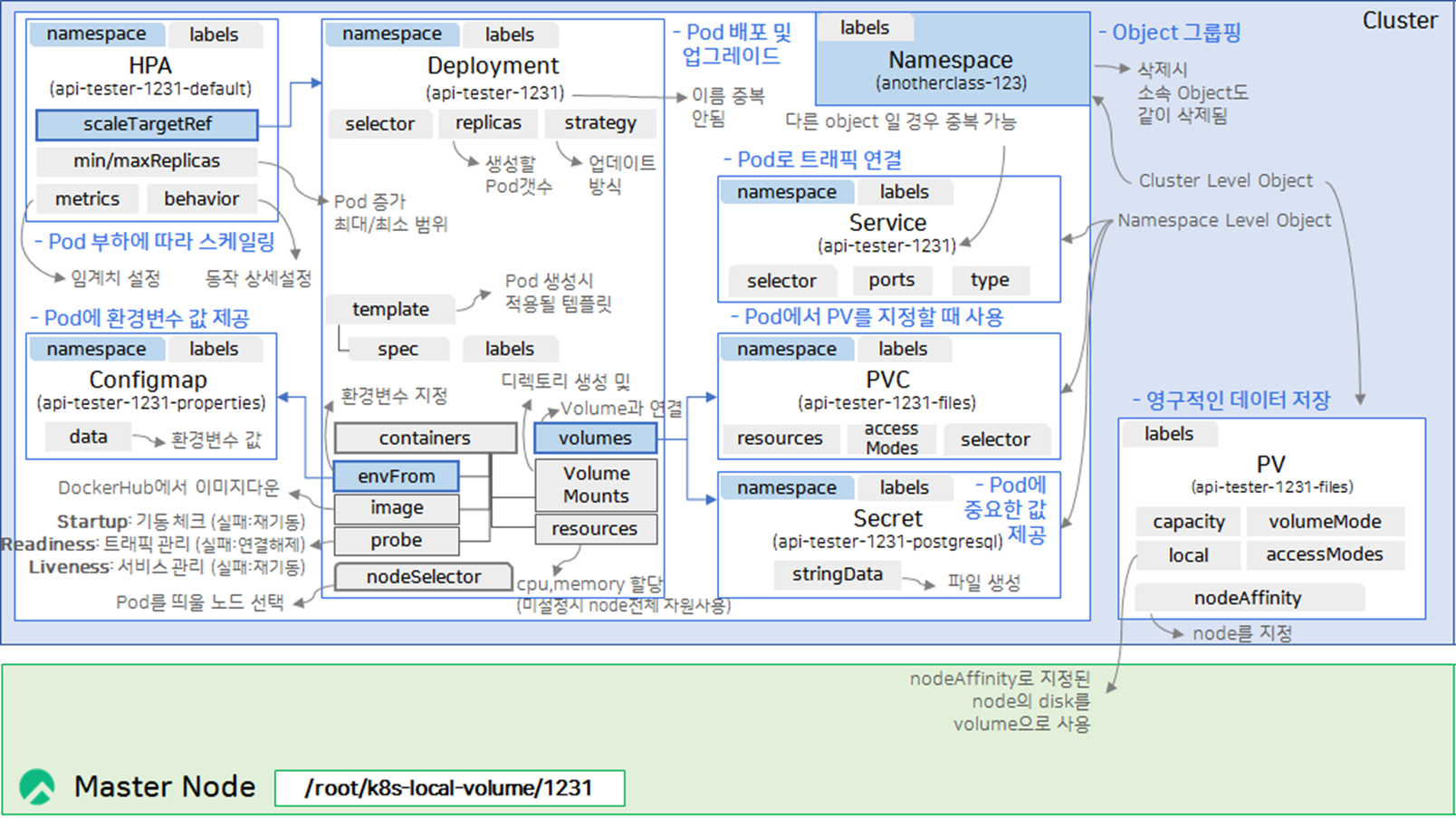
 

3. Label / Selector / Naming (1)
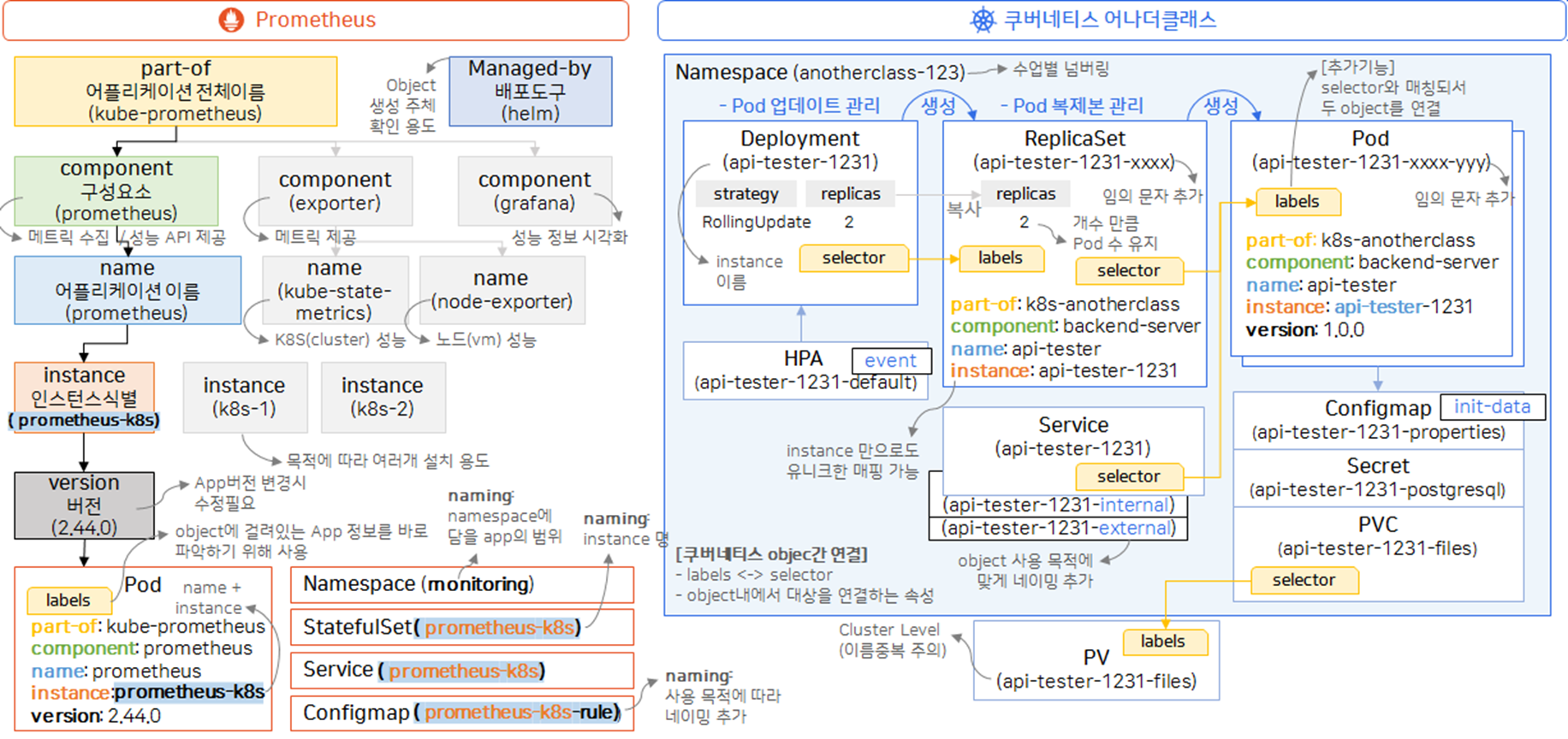
 

3. Label / Selector / Naming (2)
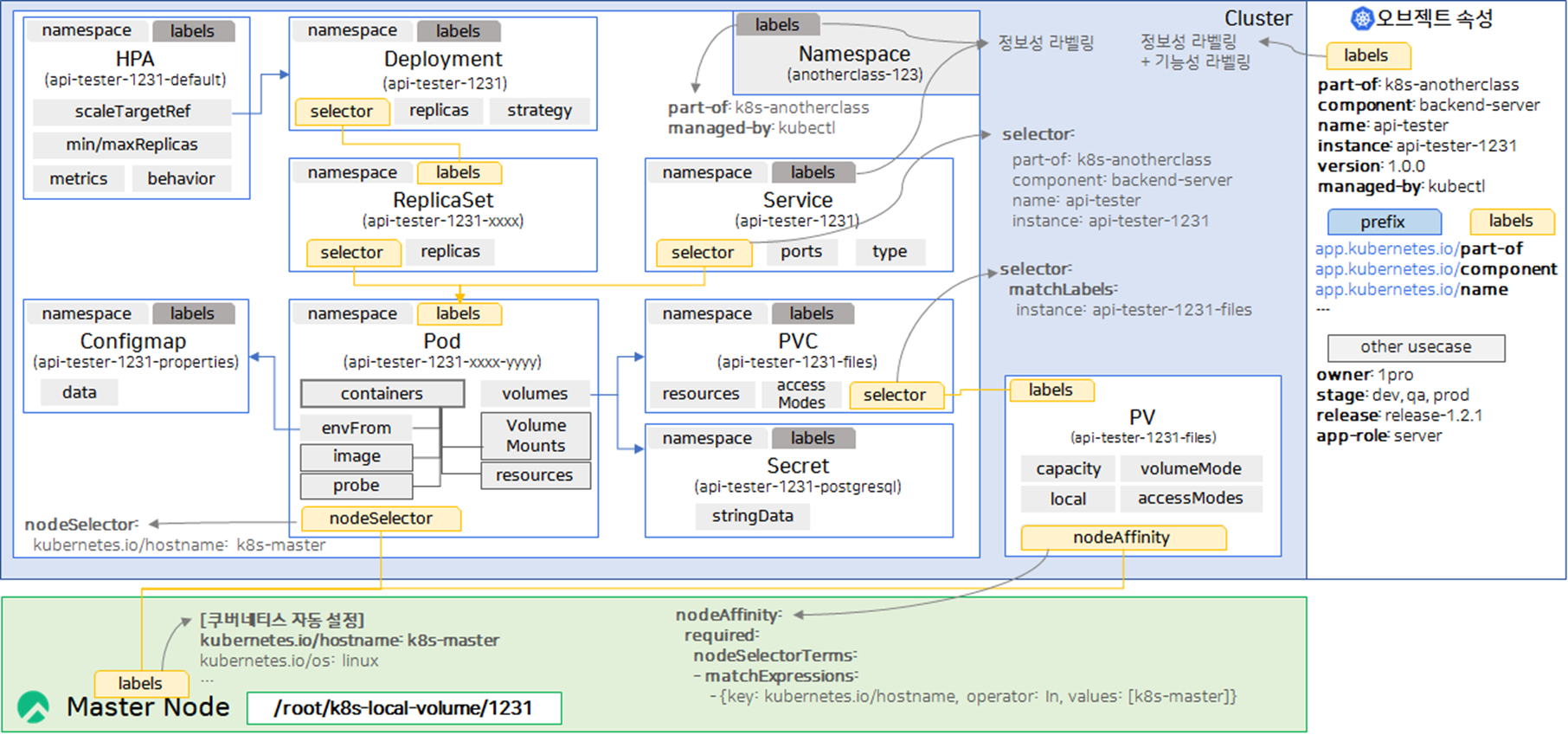


k8s Web Application 배포 시 세팅해야 하는 기본(주요) 리소스

- 웹 서비스를 완성하는 4대 핵심 리소스 : 앱 관리(Deployment), 내부 연결(Service), 부하 대응(HPA), 도메인 접속(Ingress)

  > k8s 설정 yml에서 kind에 들어가는 속성

  • Deployment : 컨테이너를 몇 개 띄울지 결정하고, 앱이 죽으면 다시 살리며, 업데이트 시 중단 없이 교체해주는 컨트롤러
  • Service : 파드는 IP가 수시로 변하므로, 서비스라는 고정된 이름을 통해 파드들이 서로 통신하거나 외부에서 접속할 수 있게 연결
  • HPA (Horizontal Pod Autoscaler) : CPU나 메모리 사용량이 설정치를 넘어가면 Deployment의 replicas를 자동으로 늘려 서버 다운을 방지
  • Ingress: 여러 서비스를 하나의 공인 IP로 묶고, 도메인(예: api.test.com)이나 주소 경로(예: /login)에 따라 트래픽을 분산하며 SSL 보안 인증서를 적용

리소스 구분

리소스명 (kind) 핵심 역할 실무 비유
Deployment 앱 생성 및 버전 관리 본체 (Server)
Service 고정 주소(IP/Port) 제공 내부 입구 (Gateway)
HPA 부하에 따른 자동 확장 보험 (Autoscaling)
Ingress 도메인 연결 및 경로 설정 간판/문지기 (Domain/L7)


1. App 배포 환경 구성 및 배포
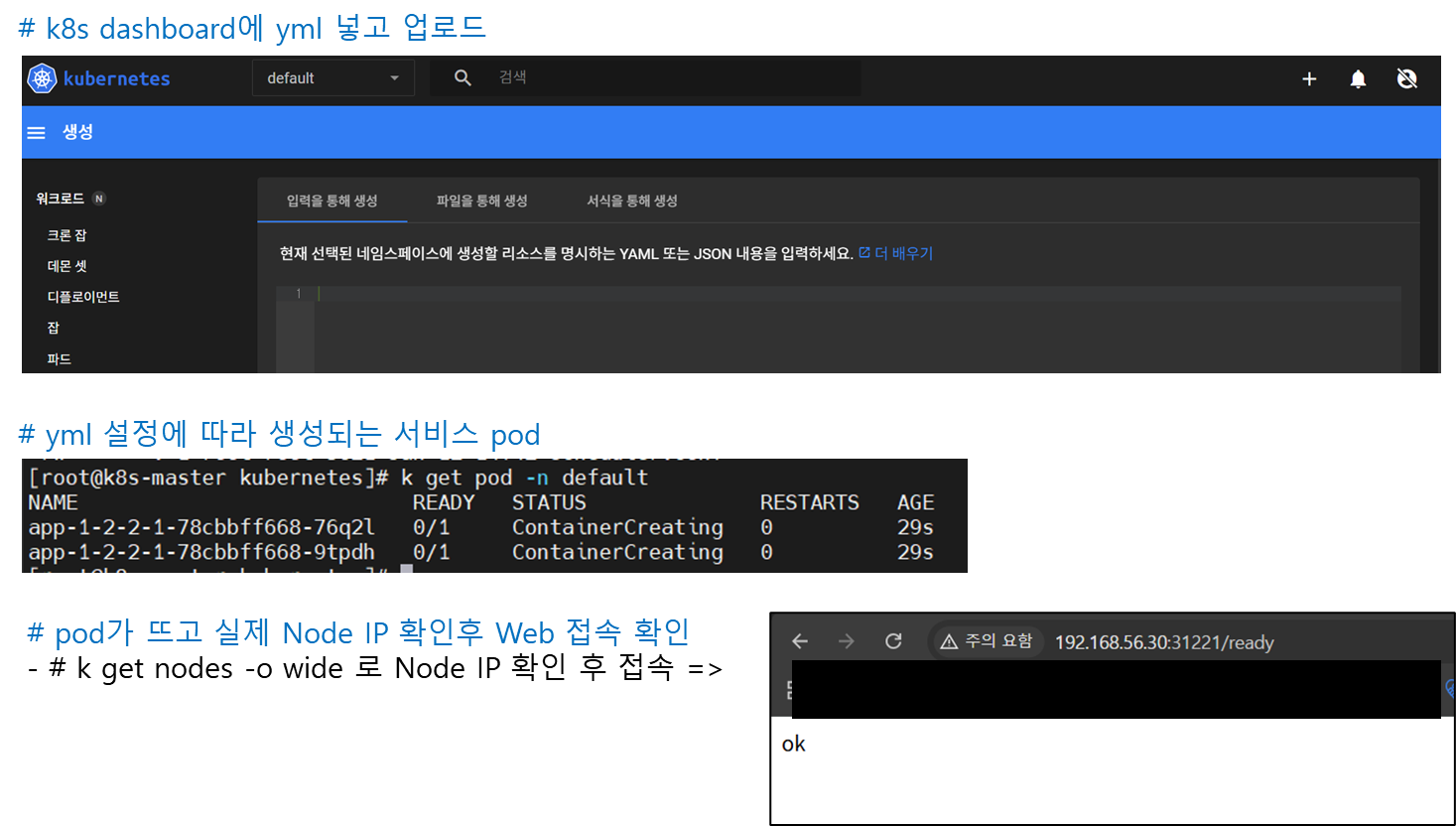
- k8s dashboard 접속 > Namespace [default] > [+] 버튼 > [입력을 통해 생성] > yaml 파일 붙여넣기 > 업로드

- 아래는 테스트용으로 썼던 yml. (나중엔 내가 개발한 APP으로 image 빌드 후 배포해보자)

더보기

apiVersion: apps/v1
kind: Deployment
metadata:
  name: app-1-2-2-1
spec:
  selector:
    matchLabels:
      app: '1.2.2.1'
  replicas: 2
  strategy:
    type: RollingUpdate
  template:
    metadata:
      labels:
        app: '1.2.2.1'
    spec:
      containers:
        - name: app-1-2-2-1
          image: 1pro/app
          imagePullPolicy: Always
          ports:
            - name: http
              containerPort: 8080
          startupProbe:
            httpGet:
              path: "/ready"
              port: http
            failureThreshold: 20
          livenessProbe:
            httpGet:
              path: "/ready"
              port: http
          readinessProbe:
            httpGet:
              path: "/ready"
              port: http
          resources:
            requests:
              memory: "100Mi"
              cpu: "100m"
            limits:
              memory: "200Mi"
              cpu: "200m"
---
apiVersion: v1
kind: Service
metadata:
  name: app-1-2-2-1
spec:
  selector:
    app: '1.2.2.1'
  ports:
    - port: 8080
      targetPort: 8080
      nodePort: 31221
  type: NodePort
---
apiVersion: autoscaling/v2
kind: HorizontalPodAutoscaler
metadata:
  name: app-1-2-2-1
spec:
  scaleTargetRef:
    apiVersion: apps/v1
    kind: Deployment
    name: app-1-2-2-1
  minReplicas: 2
  maxReplicas: 4
  metrics:
    - type: Resource
      resource:
        name: cpu
        target:
          type: Utilization
          averageUtilization: 40


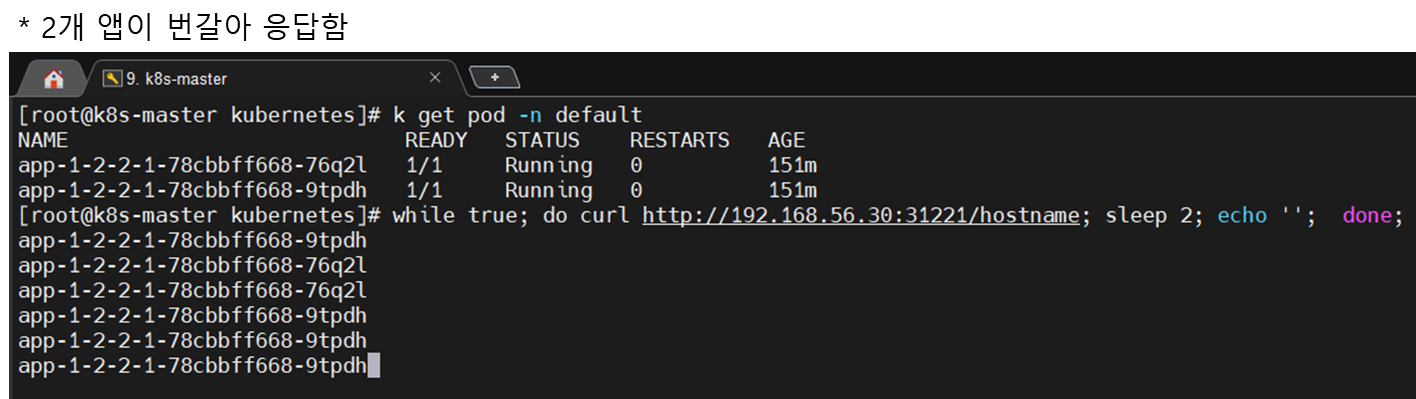
2. App에 지속적으로 트래픽 보내기 (Traffic Routing 테스트)

# k8s-master에서 2초마다 트래픽 요청

[root@k8s-master ~]# while true; do curl http://192.168.56.30:31221/hostname; sleep 2; echo '';  done;


3. AppMemory Leak 나게 하기 (Self-Healing 테스트)

# k8s-master에서 실행

[root@k8s-master ~]# curl 192.168.56.30:31221/memory-leak

* 결과 : pod 1개가 restart


4. App에 부하주기 (AutoScaling 테스트)

# k8s-master에서 요청

[root@k8s-master ~]# curl 192.168.56.30:31221/cpu-load

* pod2개 더 생성되어 총 4개가 됨

>> YAML에 설정한 HPA(Horizontal Pod Autoscaler)CPU 부하를 감지하고, 서비스 안정성을 위해 파드 개수를 자동으로 늘린 것.
>> [
상세 원인 분석]

  • 부하 발생: /cpu-load 경로로 접속하면 해당 파드의 CPU 사용량이 강제로 급증
  • 임계치 초과: 앞서 작성한 YAML에서 CPU 사용량이 40%를 넘으면 확장하도록 설정함
  • 자동 확장: 쿠버네티스가 "현재 2개로는 부하를 감당하기 어렵다"고 판단하여, 설정된 최대치인 4개(maxReplicas: 4)까지 파드를 2개 더 생성한 것

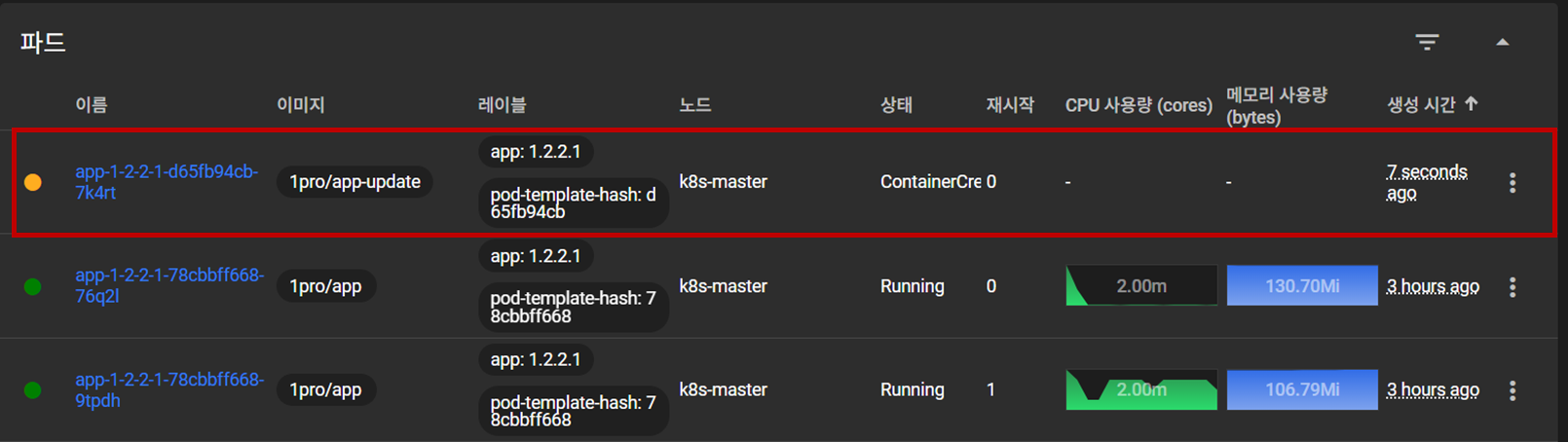
5. App 이미지 업데이트 (RollingUpdate 테스트)

- Namespace: default > 디플로이먼트 > ... > 편집

spec:

      containers:

        - name: app-1-2-2-1

          image: 1pro/app-update  # 수정

- Script 실행 시

[root@k8s-master ~]# kubectl set image -n default deployment/app-1-2-2-1 app-1-2-2-1=1pro/app-update

* 결과 : 업데이트 된 이미지가 적용된 pod가 올라올 동안, 이전 pod도 유지됨


update 중지 script

[root@k8s-master ~]# kubectl rollout undo -n default deployment/app-1-2-2-1


object 삭제 script

[root@k8s-master ~]# kubectl delete -n default deploy app-1-2-2-1

[root@k8s-master ~]# kubectl delete -n default svc app-1-2-2-1

[root@k8s-master ~]# kubectl delete -n default hpa app-1-2-2-1

이번엔 이어서 모니터링 도구들을 설치해보자. 


프로젝트 환경에서 Prometheus와 Grafana는 VM 모니터링과 DB 모니터링에 사용했었는데 Loki는 이번에 처음 사용해봤다.


1. 프로메테우스 vs 로키 : 데이터의 차이

구분 프로메테우스 (Prometheus) 로키 (Loki-Stack)
수집 데이터 숫자 (Metrics) 문자 (Logs)
핵심 질문 "현재 CPU 사용량이 몇 %인가?" "에러 발생 시점에 기록된 내용은 무엇인가?"
저장 방식 시계열 데이터베이스 (TSDB) 레이블 기반 인덱싱 및 압축 저장
주요 용도 시스템 부하 감시 및 실시간 알람 구체적인 장애 원인 분석 및 디버깅
관계 독립적 엔진 (별도 구축 필요) 독립적 엔진 (별도 구축 필요)
통합 환경 Grafana (두 데이터를 한 화면에 표시) Grafana (두 데이터를 한 화면에 표시)


2. 로키 스택, 프로메테우스, 그라파나 설치

- 하기 설치 시 스토리지 연동은 하지 않았으므로 VM 재기동시마다 로그 초기화됨


** 본 설치는 kube-prometheus git 프로젝트의 매니페스트(YAML) 방식을 활용해 메트릭(Prometheus)과 로그(Loki)를 통합 구축하는 과정임


Q. Helm과 Yaml 설치 방식의 차이는?

구분 YAML 방식 (Manifest) Helm 방식 (Package Manager)
개념 모든 설정을 직접 작성한 문서 설정을 템플릿화한 패키지 (Chart)
설치 도구 kubectl helm
설정 변경 수십 개의 파일 내부를 일일이 수정 values.yaml 파일 하나만 수정
버전 관리 수동 (파일을 직접 백업/관리) 자동 (Revision 관리로 원클릭 롤백)
학습 효과 매우 높음 (내부 구조를 다 알게 됨) 낮음 (내부가 감춰져 있음)


- yaml 방식이 설정파일들을 뜯어볼 수 있어서 공부할 때는 좋지만, 실무에서는 버전 관리, 롤백, 환경별 설정 분리가 가능한 helm 방식이 표준


1) Github(k8s-1pro)에서 Prometheus(with Grafana), Loki-Stack yaml 다운로드

- [k8s-master] Console 접속 후 아래 명령 실행

# git 설치

[root@k8s-master ~]# yum -y install git


# 로컬 저장소 생성

git init monitoring

git config --global init.defaultBranch main

cd monitoring


# remote 추가 ([root@k8s-master monitoring]#)

git remote add -f origin https://github.com/k8s-1pro/install.git


# sparse checkout 설정

git config core.sparseCheckout true

echo "ground/k8s-1.27/prometheus-2.44.0" >> .git/info/sparse-checkout

echo "ground/k8s-1.27/loki-stack-2.6.1" >> .git/info/sparse-checkout


# 다운로드

git pull origin main


2) Prometheus(with Grafana) 설치

- Github : https://github.com/prometheus-operator/kube-prometheus/tree/release-0.14


# 설치 – monitoring directory에서 진행 ([root@k8s-master monitoring]#)

kubectl apply --server-side -f ground/k8s-1.27/prometheus-2.44.0/manifests/setup

kubectl wait --for condition=Established --all CustomResourceDefinition --namespace=monitoring

kubectl apply -f ground/k8s-1.27/prometheus-2.44.0/manifests


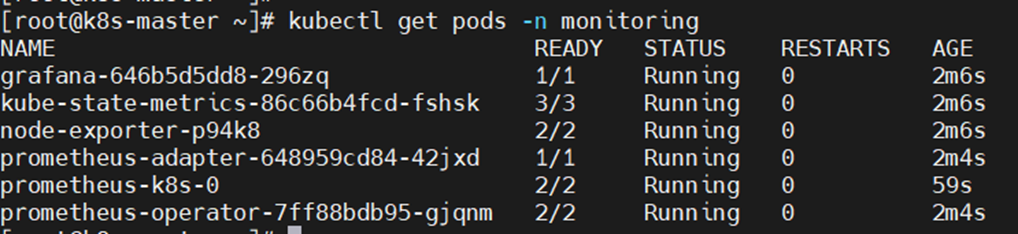
# 설치 확인 ([root@k8s-master]#)

kubectl get pods -n monitoring


3) Loki-Stack 설치

# 설치 – monitoring director에서 진행 ([root@k8s-master monitoring]#)

kubectl apply -f ground/k8s-1.27/loki-stack-2.6.1


# 설치 확인

kubectl get pods -n loki-stack


4) Grafana 접속

▶ 접속 URL : http://192.168.56.30:30001

로그인 :​ id: admin, pw: admin


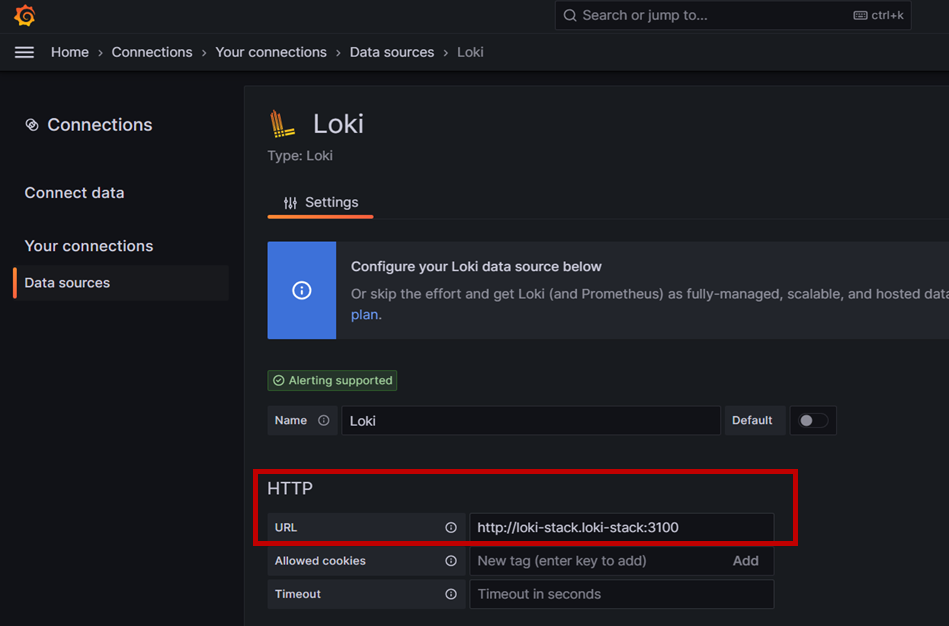
5) Grafana에서 Loki-Stack 연결

Connect data : Home > Connections > Connect data

검색에 [loki] 입력 후 항목 클릭


6) Grafana 대시보드 생성

- 메뉴 이동: Grafana 좌측 메뉴에서 Dashboards > New > Import를 클릭

- ID 입력: 아래의 공식 ID를 입력하고 Load

 > Prometheus (K8S 상태): 315 (Kubernetes Cluster 모니터링 표준)

 > Loki (로그 확인): 15141 (Loki용 공식 로그 대시보드)


모니터링 설치 삭제 시

- Prometheus(with Grafana), Loki-stack 삭제

[k8s-master] Console 접속 후 아래 명령 실행


# 모니터링 설치 폴더로 이동

[root@k8s-master ~]# cd monitoring


# Prometheus 삭제

kubectl delete --ignore-not-found=true -f ground/k8s-1.27/prometheus-2.44.0/manifests -f ground/k8s-1.27/prometheus-2.44.0/manifests/setup


# Loki-stack 삭제

kubectl delete -f ground/k8s-1.27/loki-stack-2.6.1


- TODO : 1. 설치 yml 별도로 생성하여 진행하기 / 2. VM 재기동시 이력이 초기화 되지 않도록 스토리지 설정하기

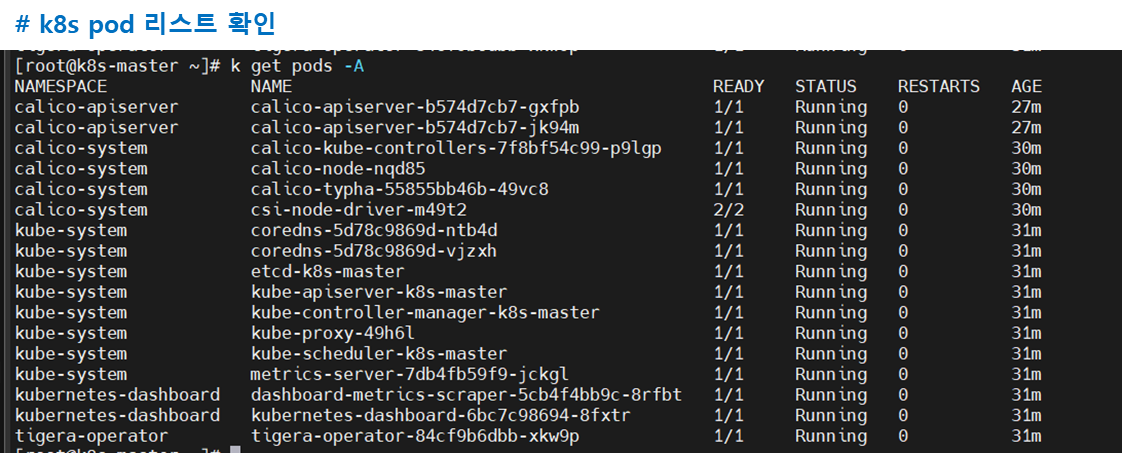
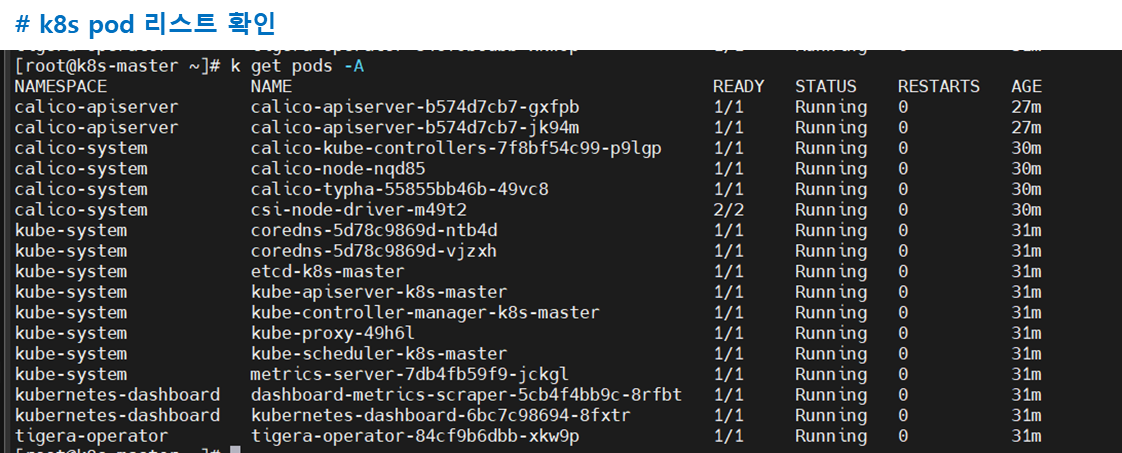
앞서 K8S 를 구축하면 아래와 같은 K8S 컴포넌트들을 확인할 수 있다. 


1. K8S 컴포넌트 

Pod 명칭 (핵심 키워드) 설명
calico-apiserver Calico 네트워크 정책 전용 API 확장 서비스
calico-kube-controllers 네트워크 리소스 상태 감시 및 정책 관리 컨트롤러
calico-node 노드 간 통신 및 실제 라우팅을 수행하는 네트워크 엔진
calico-typha 노드 확장 시 DB 부하를 줄여주는 네트워크 최적화 도구
csi-node-driver 컨테이너와 가상 머신 저장소(디스크)를 연결하는 드라이버
coredns 클러스터 내 서비스 이름을 IP로 변환하는 DNS 서비스
etcd 모든 클러스터 상태 데이터가 저장되는 핵심 데이터베이스
kube-apiserver 모든 명령이 통과하는 쿠버네티스의 중앙 제어 관문
kube-controller-manager 노드 상태 및 복제본 수 등을 관리하는 클러스터 감시자
kube-proxy 트래픽을 컨테이너로 전달하기 위한 네트워크 규칙 관리
kube-scheduler 자원 상태에 따라 컨테이너를 최적의 노드에 배치
metrics-server CPU 및 메모리 사용량을 실시간 수집하는 성능 분석 도구
dashboard-metrics-scraper 웹 대시보드 표시용 통계 데이터를 수집하는 도구
kubernetes-dashboard 웹 브라우저에서 클러스터를 관리하게 해주는 GUI UI
tigera-operator Calico 네트워크 엔진의 설치와 관리를 자동화하는 관리자


2. K8S 인터페이스 규격

- K8S 인터페이스 규격이란 : 쿠버네티스가 다양한 외부 기술(컨테이너 실행, 네트워크, 저장소)을 마치 '레고 블록'처럼 자유롭게 갈아 끼울 수 있도록 만든 표준 연결 고리


- CRI : 컨테이너 실행(런타임) 인터페이스
- CNI : 네트워크 연결(통신) 인터페이스
- CSI : '외부 저장소 연결(스토리지)'을 위한 표준 규격

* CRI & CNI : Kubelet이 CRI를 통해 컨테이너를 생성하면, 이어서 CNI가 해당 컨테이너의 네트워크 환경(IP 등)을 설정함. 1.24 버전 이후부터는 Kubelet이 직접 CNI를 부르는 대신 CRI가 CNI를 호출하는 구조로 최적화 됨

* CSI :
> 독립성: 쿠버네티스 코드를 수정하지 않고도 새로운 스토리지 드라이버를 추가할 수 있음
> 자동화: 사용자가 PVC(Persistent Volume Claim)를 요청하면, CSI가 자동으로 실제 스토리지를 생성하고 파드에 연결(Mount)해 줌
> 다양성: 클라우드 디스크뿐만 아니라 온프레미스의 하드웨어 스토리지도 플러그인 형태로 연결 가능


# CRI / CNI / CSI 핵심 비교 

구분 CRI (Runtime) CNI (Network) CSI (Storage)
역할 컨테이너 실행/관리 IP 할당 및 통신 볼륨 연결 및 데이터 저장
비유 컴퓨터 본체 (연산) 랜선 (통신) 외장 하드 (저장)
실무 질문 "컨테이너를 띄워라" "통신이 되게 하라" "데이터를 저장하라"
대표 예시 Containerd, CRI-O Calico, Cilium AWS EBS, NFS, Rook/Ceph


일프로님 강의로 K8S를 구축해보며 로컬에서 정리하고 있었지만, 블로그에 기록하면 좋을 것 같아서 차례대로 옮기려고 한다.


먼저 로컬에 K8S 환경 구축하기 부터!


** 설치 권고 환경 : Windows10/11, Cpu 4core 이상, Memory 12GB 이상, 인터넷 사용 가능 환경 ** 


1. Virtualbox 설치 (7.1.6 버전)  # 25.3.03 Version Update

- Download : https://download.virtualbox.org/virtualbox/7.1.6/VirtualBox-7.1.6-167084-Win.exe

- Site : https://www.virtualbox.org/wiki/Downloads


2. Vagrant 설치 (2.4.3 버전) # 25.3.03 Version Update

- Download : https://releases.hashicorp.com/vagrant/2.4.3/vagrant_2.4.3_windows_amd64.msi

- Site : https://developer.hashicorp.com/vagrant/downloads?product_intent=vagrant

* Vagrant
: 가상 머신(VM) 환경을 설정 파일 하나로 자동 생성하고 관리하게 해주는 도구

* 핵심 구성요소 :

Provider 가상 머신을 실제로 띄우는 엔진 (: VirtualBox, VMware)
Box 가상 머신의 템플릿(이미지). OS와 기본 설정이 이미 들어있는 압축 파일
Vagrantfile 어떤 Box를 쓸지, 네트워크는 어떻게 할지 적어둔 설계도


3. Vagrant 스크립트 실행

- 윈도우 > 실행 > cmd > 확인


# Vagrant 폴더 생성

C:\dev> mkdir k8s && cd k8s


# Vagrant 스크립트 다운로드

curl -O https://raw.githubusercontent.com/k8s-1pro/install/main/ground/k8s-1.27/vagrant-2.4.3/Vagrantfile

- 이 파일을 쓰자니, up.down 할 때마다 모니터링을 별도로 추가해야 해서 불편했다. 그래서 내 버전으로 설정 수정함.

  아래는 기존 vagrant 파일에서 모니터링 설치 및 대시보드 외부노출까지 script 추가한 버전!

더보기


Vagrant.configure("2") do |config|
    
  config.vm.box = "rockylinux/8"
  # Disk 확장설정 추가
  config.disksize.size = "50GB"

  # https://cafe.naver.com/kubeops/26
  config.vbguest.auto_update = false
  config.vm.synced_folder "./", "/vagrant", disabled: true
  config.vm.network :forwarded_port, guest: 22, host: 2222, id: "ssh", auto_correct: true
  config.vm.provision :shell, privileged: true, inline: $install_default
  config.vm.define "master-node" do |master|
    master.vm.hostname = "k8s-master"
    master.vm.network "private_network", ip: "192.168.56.30"
master.vm.provider :virtualbox do |vb|
      #vb.memory = 6144
      vb.memory = 8192 # 소영 추가 : Prometheus/Loki 가동을 위한 최소 메모리 확보
      vb.cpus = 4
  vb.customize ["modifyvm", :id, "--firmware", "efi"]
  vb.customize ["modifyvm", :id, "--nested-hw-virt", "on"]
end
    master.vm.provision :shell, privileged: true, inline: $install_master
  end

end

$install_default = <<-SHELL

echo '======== [4] Rocky Linux 기본 설정 ========'
echo '======== [4-1] 패키지 업데이트 ========'
# 강의와 동일한 실습 환경을 유지하기 위해 Linux Update 주석 처리
# yum -y update

# 초기 root 비밀번호 변경을 원하시면 아래 주석을 풀고 [새로운비밀번호]에 비번을 입력해주세요
# echo "root:새로운비밀번호" | chpasswd


echo '======== [4-2] 타임존 설정 및 동기화========'
timedatectl set-timezone Asia/Seoul
timedatectl set-ntp true
chronyc makestep

echo '======== [4-3] Disk 확장 / Bug: soft lockup 설정 추가========'
https://cafe.naver.com/kubeops/25
yum install -y cloud-utils-growpart
growpart /dev/sda 4
xfs_growfs /dev/sda4

echo '======== [4-4] [WARNING FileExisting-tc]: tc not found in system path 로그 관련 업데이트 ========'
yum install -y yum-utils iproute-tc

echo '======= [4-4] hosts 설정 =========='
cat << EOF >> /etc/hosts
192.168.56.30 k8s-master
EOF

echo '======== [5] kubeadm 설치 전 사전작업 ========'
echo '======== [5] 방화벽 해제 ========'
systemctl stop firewalld && systemctl disable firewalld

echo '======== [5] Swap 비활성화 ========'
swapoff -a && sed -i '/ swap / s/^/#/' /etc/fstab


echo '======== [6] 컨테이너 런타임 설치 ========'
echo '======== [6-1] 컨테이너 런타임 설치 전 사전작업 ========'
echo '======== [6-1] iptable 세팅 ========'
cat <<EOF |tee /etc/modules-load.d/k8s.conf
overlay
br_netfilter
EOF

modprobe overlay
modprobe br_netfilter

cat <<EOF |tee /etc/sysctl.d/k8s.conf
net.bridge.bridge-nf-call-iptables  = 1
net.bridge.bridge-nf-call-ip6tables = 1
net.ipv4.ip_forward                 = 1
EOF

sysctl --system

echo '======== [6-2] 컨테이너 런타임 (containerd 설치) ========'
echo '======== [6-2-1] containerd 패키지 설치 (option2) ========'
echo '======== [6-2-1-1] docker engine 설치 ========'
echo '======== [6-2-1-1] repo 설정 ========'
yum-config-manager --add-repo https://download.docker.com/linux/centos/docker-ce.repo

echo '======== [6-2-1-1] containerd 설치 ========'
yum install -y containerd.io-1.6.21-3.1.el8
systemctl daemon-reload
systemctl enable --now containerd

echo '======== [6-3] 컨테이너 런타임 : cri 활성화 ========'
# defualt cgroupfs에서 systemd로 변경 (kubernetes default는 systemd)
containerd config default > /etc/containerd/config.toml
sed -i 's/ SystemdCgroup = false/ SystemdCgroup = true/' /etc/containerd/config.toml
systemctl restart containerd


echo '======== [7] kubeadm 설치 ========'
echo '======== [7] repo 설정 ========'
cat <<EOF | sudo tee /etc/yum.repos.d/kubernetes.repo
[kubernetes]
name=Kubernetes
baseurl=https://pkgs.k8s.io/core:/stable:/v1.27/rpm/
enabled=1
gpgcheck=1
gpgkey=https://pkgs.k8s.io/core:/stable:/v1.27/rpm/repodata/repomd.xml.key
exclude=kubelet kubeadm kubectl cri-tools kubernetes-cni
EOF


echo '======== [7] SELinux 설정 ========'
setenforce 0
sed -i 's/^SELINUX=enforcing$/SELINUX=permissive/' /etc/selinux/config

echo '======== [7] kubelet, kubeadm, kubectl 패키지 설치 ========'
yum install -y kubelet-1.27.2-150500.1.1.x86_64 kubeadm-1.27.2-150500.1.1.x86_64 kubectl-1.27.2-150500.1.1.x86_64 --disableexcludes=kubernetes
systemctl enable --now kubelet

SHELL


$install_master = <<-SHELL

echo '======== [8] kubeadm으로 클러스터 생성  ========'
echo '======== [8-1] 클러스터 초기화 (Pod Network 세팅) ========'
kubeadm init --pod-network-cidr=20.96.0.0/12 --apiserver-advertise-address 192.168.56.30

echo '======== [8-2] kubectl 사용 설정 ========'
mkdir -p $HOME/.kube
cp -i /etc/kubernetes/admin.conf $HOME/.kube/config
chown $(id -u):$(id -g) $HOME/.kube/config

echo '======== [8-3] Pod Network 설치 (calico) ========'
kubectl create -f https://raw.githubusercontent.com/k8s-1pro/install/main/ground/k8s-1.27/calico-3.26.4/calico.yaml
kubectl create -f https://raw.githubusercontent.com/k8s-1pro/install/main/ground/k8s-1.27/calico-3.26.4/calico-custom.yaml

echo '======== [8-4] Master에 Pod를 생성 할수 있도록 설정 ========'
kubectl taint nodes k8s-master node-role.kubernetes.io/control-plane-


echo '======== [9] 쿠버네티스 편의기능 설치 ========'
echo '======== [9-1] kubectl 자동완성 기능 ========'
echo "source <(kubectl completion bash)" >> ~/.bashrc
echo 'alias k=kubectl' >>~/.bashrc
echo 'complete -o default -F __start_kubectl k' >>~/.bashrc

echo '======== [9-2] Dashboard 설치 ========'
kubectl create -f https://raw.githubusercontent.com/k8s-1pro/install/main/ground/k8s-1.27/dashboard-2.7.0/dashboard.yaml

echo '======== ***** 대시보드 외부 오픈 (custom) ***** ========'
sleep 10  # <--- [중요] 대시보드 API가 준비될 시간을 줍니다.
# [설정 1] NodePort 30000번으로 고정
kubectl patch svc kubernetes-dashboard -n kubernetes-dashboard -p '{"spec": {"type": "NodePort", "ports": [{"port": 443, "nodePort": 30000, "targetPort": 8443}]}}'

# [설정 2] 로그인 화면에서 Skip 버튼 활성화
kubectl patch deployment kubernetes-dashboard -n kubernetes-dashboard --type 'json' -p '[{"op": "add", "path": "/spec/template/spec/containers/0/args/-", "value": "--enable-skip-login"}]'

# [설정 3] Skip 버튼 클릭 시 관리자 권한 부여
kubectl create clusterrolebinding dashboard-skip-admin --clusterrole=cluster-admin --serviceaccount=kubernetes-dashboard:kubernetes-dashboard

echo '======== ***** 대시보드 외부 오픈 (custom) 끝 ***** ========'

echo '======== [9-3] Metrics Server 설치 ========'
kubectl create -f https://raw.githubusercontent.com/k8s-1pro/install/main/ground/k8s-1.27/metrics-server-0.6.3/metrics-server.yaml

echo '======== [10] custom : 모니터링 (Prometheus & Loki) 설치 시작 ========'
# [10-1] Git 설치 및 레포지토리 구성
yum -y install git
cd $HOME
git init monitoring
cd monitoring
git remote add -f origin https://github.com/k8s-1pro/install.git
git config core.sparseCheckout true
echo "ground/k8s-1.27/prometheus-2.44.0" >> .git/info/sparse-checkout
echo "ground/k8s-1.27/loki-stack-2.6.1" >> .git/info/sparse-checkout
git pull origin main

# [10-2] Prometheus & Grafana 설치
kubectl apply --server-side -f ground/k8s-1.27/prometheus-2.44.0/manifests/setup
kubectl wait --for condition=Established --all CustomResourceDefinition --namespace=monitoring --timeout=300s
kubectl apply -f ground/k8s-1.27/prometheus-2.44.0/manifests

# [10-3] Loki-Stack 설치 (로컬 노트북 CPU 부족으로 주석처리)
# kubectl apply -f ground/k8s-1.27/loki-stack-2.6.1

echo '======== [10-4] 모니터링 외부 오픈 설정 (Grafana NodePort 30001) ========'
sleep 20
# Grafana 서비스를 NodePort 30001로 오픈하여 외부 접속 허용
kubectl patch svc grafana -n monitoring -p '{"spec": {"type": "NodePort", "ports": [{"port": 3000, "nodePort": 30001, "targetPort": 3000}]}}'

echo '========  custom : 모니터링 설치 완료 (Grafana: http://192.168.56.30:30001) ========'

SHELL


# Rocky Linux Repo setting (Rocky Linux boxvagrant에 등록)

방법 1) 저장소 연결 후 다운로드 및 vagarnt에 등록

curl -O https://raw.githubusercontent.com/k8s-1pro/install/main/ground/k8s-1.27/vagrant-2.4.3/rockylinux-repo.json

vagrant box add rockylinux-repo.json


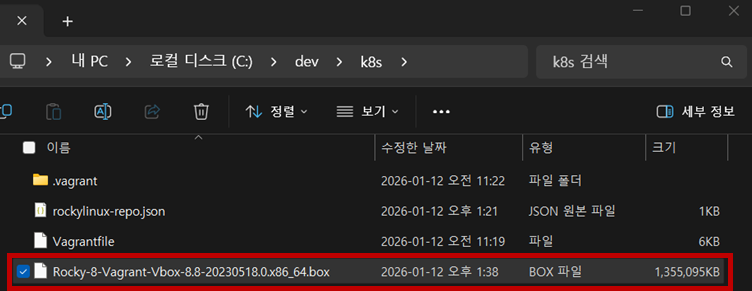
방법 2) 방법 1 실행 중, rocky box 파일의 용량이 커서 다운로드가 너무 느림.
=> FDM
(Free Download Manager) 설치 후 병렬 스레드로 로컬에 다운로드를 완료한 후,
      로컬 image box 파일을 vagrant 등록함.

vagrant box add rockylinux/8 Rocky-8-Vagrant-Vbox-8.8-20230518.0.x86_64.box


# Vagrant Disk 설정 Plugin 설치

vagrant plugin install vagrant-vbguest vagrant-disksize


# Vagrant 실행 (VM생성)

vagrant up

※ Vagrant 명령어
vagrant init : 프로비저닝을 위한 기초 파일 생성
vagrant up : Vagrantfile을 읽어 프로비저닝 진행 (최초 VM생성 할때만 사용. 생성 이후 부터 컴퓨터를 껐다 켜거나 했을 때, VM기동/중지는 Virtualbox UI를 사용하는 걸 권장)
vagrant halt : 베이그런트에서 다루는 가상머신 종료
vagrant destroy : 베이그런트에서 관리하는 가상머신 삭제  (vagrant up으로 VM 생성 중 에러가 났을 때 이 명령으로 삭제)
vagrant ssh : 베이그런트에서 관리하는 가상머신에 ssh 접속 (multi vm 환경은 ssh 뒤에 vm name 기재)
vagrant provision : 베이그런트에서 관리하는 가상머신에 변경된 설정 적용
vagrant box list : 등록된 box (image) 파일 확인


4. MobaXterm 설치 (23.1 버전)

- Download : https://download.mobatek.net/2312023031823706/MobaXterm_Portable_v23.1.zip

- Site : https://mobaxterm.mobatek.net/download-home-edition.html

* MobaXterm : SSH, RDP, FTP, SFTP 등 다양한 네트워크 프로토콜을 단 하나의 프로그램에서 실행할 수 있는 통합 터미널 솔루션

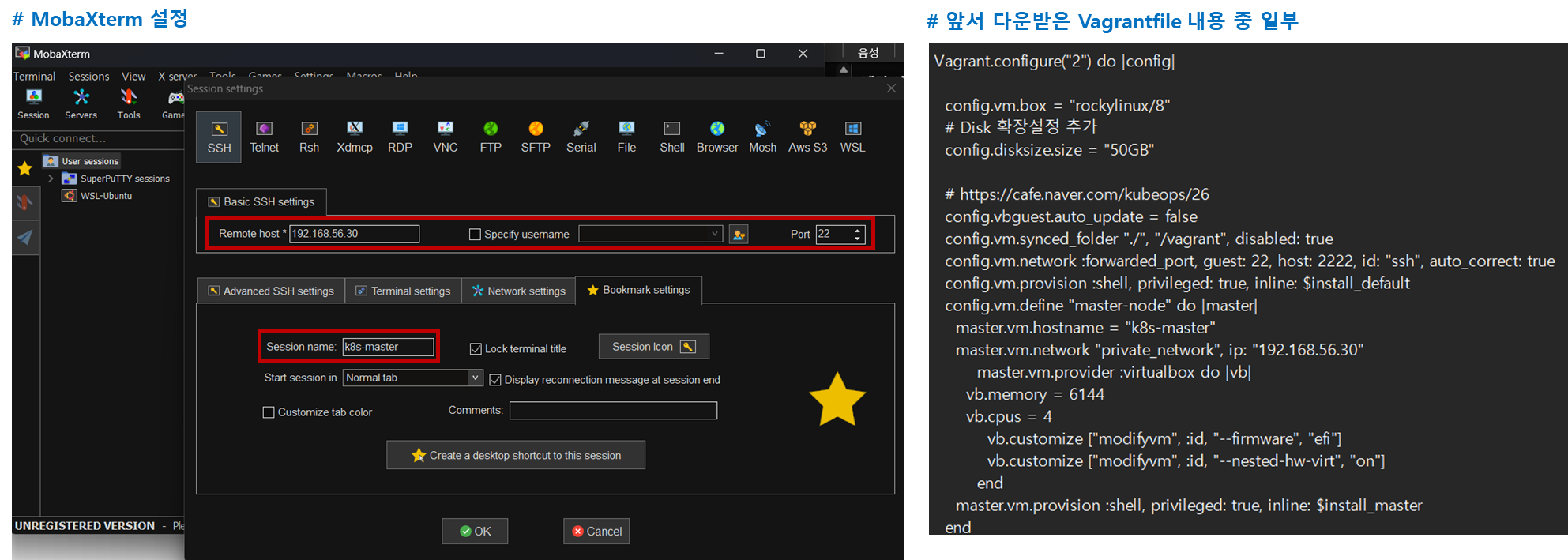
5. MobaXterm 으로 Master Node 원격 접속 (Windows)

- Sessions > New session > SSH 을 선택해서 접속 세션 생성

- 최초 idroot, passwordvagrant

- 참고 이미지 


# TODO : master node 와 worker node를 모두 생성하고 클러스터 등록하도록 yml 을 수정하고 VM 생성

+ Recent posts