일프로님 강의로 K8S를 구축해보며 로컬에서 정리하고 있었지만, 블로그에 기록하면 좋을 것 같아서 차례대로 옮기려고 한다.
먼저 로컬에 K8S 환경 구축하기 부터!
** 설치 권고 환경 : Windows10/11, Cpu 4core 이상, Memory 12GB 이상, 인터넷 사용 가능 환경 **
1. Virtualbox 설치 (7.1.6 버전) # 25.3.03 Version Update
- Download : https://download.virtualbox.org/virtualbox/7.1.6/VirtualBox-7.1.6-167084-Win.exe
- Site : https://www.virtualbox.org/wiki/Downloads
2. Vagrant 설치 (2.4.3 버전) # 25.3.03 Version Update
- Download : https://releases.hashicorp.com/vagrant/2.4.3/vagrant_2.4.3_windows_amd64.msi
- Site : https://developer.hashicorp.com/vagrant/downloads?product_intent=vagrant
* Vagrant : 가상 머신(VM) 환경을 설정 파일 하나로 자동 생성하고 관리하게 해주는 도구
* 핵심 구성요소 :
| Provider | 가상 머신을 실제로 띄우는 엔진 (예: VirtualBox, VMware) |
| Box | 가상 머신의 템플릿(이미지). OS와 기본 설정이 이미 들어있는 압축 파일 |
| Vagrantfile | 어떤 Box를 쓸지, 네트워크는 어떻게 할지 적어둔 설계도 |
3. Vagrant 스크립트 실행
- 윈도우 > 실행 > cmd > 확인
# Vagrant 폴더 생성
C:\dev> mkdir k8s && cd k8s
# Vagrant 스크립트 다운로드
curl -O https://raw.githubusercontent.com/k8s-1pro/install/main/ground/k8s-1.27/vagrant-2.4.3/Vagrantfile
- 이 파일을 쓰자니, up.down 할 때마다 모니터링을 별도로 추가해야 해서 불편했다. 그래서 내 버전으로 설정 수정함.
아래는 기존 vagrant 파일에서 모니터링 설치 및 대시보드 외부노출까지 script 추가한 버전!
Vagrant.configure("2") do |config|
config.vm.box = "rockylinux/8"
# Disk 확장설정 추가
config.disksize.size = "50GB"
# https://cafe.naver.com/kubeops/26
config.vbguest.auto_update = false
config.vm.synced_folder "./", "/vagrant", disabled: true
config.vm.network :forwarded_port, guest: 22, host: 2222, id: "ssh", auto_correct: true
config.vm.provision :shell, privileged: true, inline: $install_default
config.vm.define "master-node" do |master|
master.vm.hostname = "k8s-master"
master.vm.network "private_network", ip: "192.168.56.30"
master.vm.provider :virtualbox do |vb|
#vb.memory = 6144
vb.memory = 8192 # 소영 추가 : Prometheus/Loki 가동을 위한 최소 메모리 확보
vb.cpus = 4
vb.customize ["modifyvm", :id, "--firmware", "efi"]
vb.customize ["modifyvm", :id, "--nested-hw-virt", "on"]
end
master.vm.provision :shell, privileged: true, inline: $install_master
end
end
$install_default = <<-SHELL
echo '======== [4] Rocky Linux 기본 설정 ========'
echo '======== [4-1] 패키지 업데이트 ========'
# 강의와 동일한 실습 환경을 유지하기 위해 Linux Update 주석 처리
# yum -y update
# 초기 root 비밀번호 변경을 원하시면 아래 주석을 풀고 [새로운비밀번호]에 비번을 입력해주세요
# echo "root:새로운비밀번호" | chpasswd
echo '======== [4-2] 타임존 설정 및 동기화========'
timedatectl set-timezone Asia/Seoul
timedatectl set-ntp true
chronyc makestep
echo '======== [4-3] Disk 확장 / Bug: soft lockup 설정 추가========'
# https://cafe.naver.com/kubeops/25
yum install -y cloud-utils-growpart
growpart /dev/sda 4
xfs_growfs /dev/sda4
echo '======== [4-4] [WARNING FileExisting-tc]: tc not found in system path 로그 관련 업데이트 ========'
yum install -y yum-utils iproute-tc
echo '======= [4-4] hosts 설정 =========='
cat << EOF >> /etc/hosts
192.168.56.30 k8s-master
EOF
echo '======== [5] kubeadm 설치 전 사전작업 ========'
echo '======== [5] 방화벽 해제 ========'
systemctl stop firewalld && systemctl disable firewalld
echo '======== [5] Swap 비활성화 ========'
swapoff -a && sed -i '/ swap / s/^/#/' /etc/fstab
echo '======== [6] 컨테이너 런타임 설치 ========'
echo '======== [6-1] 컨테이너 런타임 설치 전 사전작업 ========'
echo '======== [6-1] iptable 세팅 ========'
cat <<EOF |tee /etc/modules-load.d/k8s.conf
overlay
br_netfilter
EOF
modprobe overlay
modprobe br_netfilter
cat <<EOF |tee /etc/sysctl.d/k8s.conf
net.bridge.bridge-nf-call-iptables = 1
net.bridge.bridge-nf-call-ip6tables = 1
net.ipv4.ip_forward = 1
EOF
sysctl --system
echo '======== [6-2] 컨테이너 런타임 (containerd 설치) ========'
echo '======== [6-2-1] containerd 패키지 설치 (option2) ========'
echo '======== [6-2-1-1] docker engine 설치 ========'
echo '======== [6-2-1-1] repo 설정 ========'
yum-config-manager --add-repo https://download.docker.com/linux/centos/docker-ce.repo
echo '======== [6-2-1-1] containerd 설치 ========'
yum install -y containerd.io-1.6.21-3.1.el8
systemctl daemon-reload
systemctl enable --now containerd
echo '======== [6-3] 컨테이너 런타임 : cri 활성화 ========'
# defualt cgroupfs에서 systemd로 변경 (kubernetes default는 systemd)
containerd config default > /etc/containerd/config.toml
sed -i 's/ SystemdCgroup = false/ SystemdCgroup = true/' /etc/containerd/config.toml
systemctl restart containerd
echo '======== [7] kubeadm 설치 ========'
echo '======== [7] repo 설정 ========'
cat <<EOF | sudo tee /etc/yum.repos.d/kubernetes.repo
[kubernetes]
name=Kubernetes
baseurl=https://pkgs.k8s.io/core:/stable:/v1.27/rpm/
enabled=1
gpgcheck=1
gpgkey=https://pkgs.k8s.io/core:/stable:/v1.27/rpm/repodata/repomd.xml.key
exclude=kubelet kubeadm kubectl cri-tools kubernetes-cni
EOF
echo '======== [7] SELinux 설정 ========'
setenforce 0
sed -i 's/^SELINUX=enforcing$/SELINUX=permissive/' /etc/selinux/config
echo '======== [7] kubelet, kubeadm, kubectl 패키지 설치 ========'
yum install -y kubelet-1.27.2-150500.1.1.x86_64 kubeadm-1.27.2-150500.1.1.x86_64 kubectl-1.27.2-150500.1.1.x86_64 --disableexcludes=kubernetes
systemctl enable --now kubelet
SHELL
$install_master = <<-SHELL
echo '======== [8] kubeadm으로 클러스터 생성 ========'
echo '======== [8-1] 클러스터 초기화 (Pod Network 세팅) ========'
kubeadm init --pod-network-cidr=20.96.0.0/12 --apiserver-advertise-address 192.168.56.30
echo '======== [8-2] kubectl 사용 설정 ========'
mkdir -p $HOME/.kube
cp -i /etc/kubernetes/admin.conf $HOME/.kube/config
chown $(id -u):$(id -g) $HOME/.kube/config
echo '======== [8-3] Pod Network 설치 (calico) ========'
kubectl create -f https://raw.githubusercontent.com/k8s-1pro/install/main/ground/k8s-1.27/calico-3.26.4/calico.yaml
kubectl create -f https://raw.githubusercontent.com/k8s-1pro/install/main/ground/k8s-1.27/calico-3.26.4/calico-custom.yaml
echo '======== [8-4] Master에 Pod를 생성 할수 있도록 설정 ========'
kubectl taint nodes k8s-master node-role.kubernetes.io/control-plane-
echo '======== [9] 쿠버네티스 편의기능 설치 ========'
echo '======== [9-1] kubectl 자동완성 기능 ========'
echo "source <(kubectl completion bash)" >> ~/.bashrc
echo 'alias k=kubectl' >>~/.bashrc
echo 'complete -o default -F __start_kubectl k' >>~/.bashrc
echo '======== [9-2] Dashboard 설치 ========'
kubectl create -f https://raw.githubusercontent.com/k8s-1pro/install/main/ground/k8s-1.27/dashboard-2.7.0/dashboard.yaml
echo '======== ***** 대시보드 외부 오픈 (custom) ***** ========'
sleep 10 # <--- [중요] 대시보드 API가 준비될 시간을 줍니다.
# [설정 1] NodePort 30000번으로 고정
kubectl patch svc kubernetes-dashboard -n kubernetes-dashboard -p '{"spec": {"type": "NodePort", "ports": [{"port": 443, "nodePort": 30000, "targetPort": 8443}]}}'
# [설정 2] 로그인 화면에서 Skip 버튼 활성화
kubectl patch deployment kubernetes-dashboard -n kubernetes-dashboard --type 'json' -p '[{"op": "add", "path": "/spec/template/spec/containers/0/args/-", "value": "--enable-skip-login"}]'
# [설정 3] Skip 버튼 클릭 시 관리자 권한 부여
kubectl create clusterrolebinding dashboard-skip-admin --clusterrole=cluster-admin --serviceaccount=kubernetes-dashboard:kubernetes-dashboard
echo '======== ***** 대시보드 외부 오픈 (custom) 끝 ***** ========'
echo '======== [9-3] Metrics Server 설치 ========'
kubectl create -f https://raw.githubusercontent.com/k8s-1pro/install/main/ground/k8s-1.27/metrics-server-0.6.3/metrics-server.yaml
echo '======== [10] custom : 모니터링 (Prometheus & Loki) 설치 시작 ========'
# [10-1] Git 설치 및 레포지토리 구성
yum -y install git
cd $HOME
git init monitoring
cd monitoring
git remote add -f origin https://github.com/k8s-1pro/install.git
git config core.sparseCheckout true
echo "ground/k8s-1.27/prometheus-2.44.0" >> .git/info/sparse-checkout
echo "ground/k8s-1.27/loki-stack-2.6.1" >> .git/info/sparse-checkout
git pull origin main
# [10-2] Prometheus & Grafana 설치
kubectl apply --server-side -f ground/k8s-1.27/prometheus-2.44.0/manifests/setup
kubectl wait --for condition=Established --all CustomResourceDefinition --namespace=monitoring --timeout=300s
kubectl apply -f ground/k8s-1.27/prometheus-2.44.0/manifests
# [10-3] Loki-Stack 설치 (로컬 노트북 CPU 부족으로 주석처리)
# kubectl apply -f ground/k8s-1.27/loki-stack-2.6.1
echo '======== [10-4] 모니터링 외부 오픈 설정 (Grafana NodePort 30001) ========'
sleep 20
# Grafana 서비스를 NodePort 30001로 오픈하여 외부 접속 허용
kubectl patch svc grafana -n monitoring -p '{"spec": {"type": "NodePort", "ports": [{"port": 3000, "nodePort": 30001, "targetPort": 3000}]}}'
echo '======== custom : 모니터링 설치 완료 (Grafana: http://192.168.56.30:30001) ========'
SHELL
# Rocky Linux Repo setting (Rocky Linux box를 vagrant에 등록)
방법 1) 저장소 연결 후 다운로드 및 vagarnt에 등록
vagrant box add rockylinux-repo.json
방법 2) 방법 1 실행 중, rocky box 파일의 용량이 커서 다운로드가 너무 느림.
=> FDM (Free Download Manager) 설치 후 병렬 스레드로 로컬에 다운로드를 완료한 후,
로컬 image box 파일을 vagrant 등록함.
vagrant box add rockylinux/8 Rocky-8-Vagrant-Vbox-8.8-20230518.0.x86_64.box

# Vagrant Disk 설정 Plugin 설치
vagrant plugin install vagrant-vbguest vagrant-disksize
# Vagrant 실행 (VM생성)
vagrant up
| ※ Vagrant 명령어 vagrant init : 프로비저닝을 위한 기초 파일 생성 vagrant up : Vagrantfile을 읽어 프로비저닝 진행 (최초 VM생성 할때만 사용. 생성 이후 부터 컴퓨터를 껐다 켜거나 했을 때, VM기동/중지는 Virtualbox UI를 사용하는 걸 권장) vagrant halt : 베이그런트에서 다루는 가상머신 종료 vagrant destroy : 베이그런트에서 관리하는 가상머신 삭제 (vagrant up으로 VM 생성 중 에러가 났을 때 이 명령으로 삭제) vagrant ssh : 베이그런트에서 관리하는 가상머신에 ssh 접속 (multi vm 환경은 ssh 뒤에 vm name 기재) vagrant provision : 베이그런트에서 관리하는 가상머신에 변경된 설정 적용 vagrant box list : 등록된 box (image) 파일 확인 |
4. MobaXterm 설치 (23.1 버전)
- Download : https://download.mobatek.net/2312023031823706/MobaXterm_Portable_v23.1.zip
- Site : https://mobaxterm.mobatek.net/download-home-edition.html
* MobaXterm : SSH, RDP, FTP, SFTP 등 다양한 네트워크 프로토콜을 단 하나의 프로그램에서 실행할 수 있는 통합 터미널 솔루션
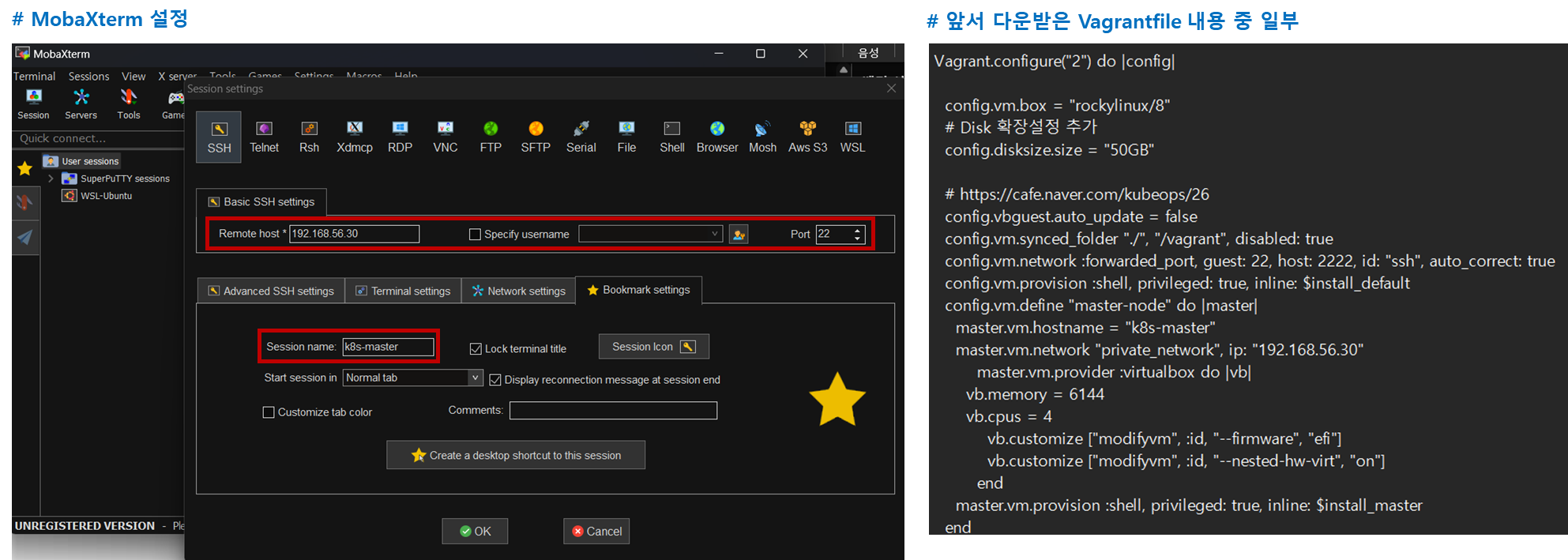
5. MobaXterm 으로 Master Node 원격 접속 (Windows)
- Sessions > New session > SSH 을 선택해서 접속 세션 생성
- 최초 id는 root, password는 vagrant
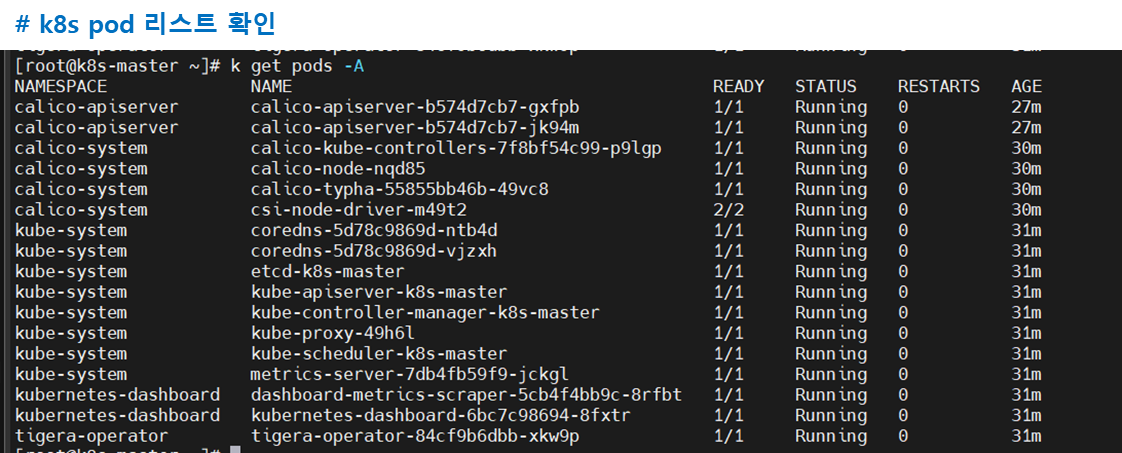
- 참고 이미지
# TODO : master node 와 worker node를 모두 생성하고 클러스터 등록하도록 yml 을 수정하고 VM 생성
'Cloud & Infra > K8S' 카테고리의 다른 글
| [K8S] 트러블슈팅 - 마스터 노드 재기동 후 정적 파드 실행 오류 (0) | 2026.03.31 |
|---|---|
| [K8S] K8S object 이해 (0) | 2026.03.16 |
| [K8S] App 배포 및 주요기능(Routing, AutoScaling 등) Test (0) | 2026.03.16 |
| [K8S] K8S에서 Prometheus, Loki, Grafana 설치하기 (0) | 2026.03.11 |
| [K8S] K8S 구성요소(컴포넌트)와 인터페이스 규격 (0) | 2026.03.10 |