이번엔 이어서 모니터링 도구들을 설치해보자.
프로젝트 환경에서 Prometheus와 Grafana는 VM 모니터링과 DB 모니터링에 사용했었는데 Loki는 이번에 처음 사용해봤다.
1. 프로메테우스 vs 로키 : 데이터의 차이
| 구분 | 프로메테우스 (Prometheus) | 로키 (Loki-Stack) |
| 수집 데이터 | 숫자 (Metrics) | 문자 (Logs) |
| 핵심 질문 | "현재 CPU 사용량이 몇 %인가?" | "에러 발생 시점에 기록된 내용은 무엇인가?" |
| 저장 방식 | 시계열 데이터베이스 (TSDB) | 레이블 기반 인덱싱 및 압축 저장 |
| 주요 용도 | 시스템 부하 감시 및 실시간 알람 | 구체적인 장애 원인 분석 및 디버깅 |
| 관계 | 독립적 엔진 (별도 구축 필요) | 독립적 엔진 (별도 구축 필요) |
| 통합 환경 | Grafana (두 데이터를 한 화면에 표시) | Grafana (두 데이터를 한 화면에 표시) |
2. 로키 스택, 프로메테우스, 그라파나 설치
- 하기 설치 시 스토리지 연동은 하지 않았으므로 VM 재기동시마다 로그 초기화됨
** 본 설치는 kube-prometheus git 프로젝트의 매니페스트(YAML) 방식을 활용해 메트릭(Prometheus)과 로그(Loki)를 통합 구축하는 과정임
Q. Helm과 Yaml 설치 방식의 차이는?
| 구분 | YAML 방식 (Manifest) | Helm 방식 (Package Manager) |
| 개념 | 모든 설정을 직접 작성한 문서 | 설정을 템플릿화한 패키지 (Chart) |
| 설치 도구 | kubectl | helm |
| 설정 변경 | 수십 개의 파일 내부를 일일이 수정 | values.yaml 파일 하나만 수정 |
| 버전 관리 | 수동 (파일을 직접 백업/관리) | 자동 (Revision 관리로 원클릭 롤백) |
| 학습 효과 | 매우 높음 (내부 구조를 다 알게 됨) | 낮음 (내부가 감춰져 있음) |
- yaml 방식이 설정파일들을 뜯어볼 수 있어서 공부할 때는 좋지만, 실무에서는 버전 관리, 롤백, 환경별 설정 분리가 가능한 helm 방식이 표준
1) Github(k8s-1pro)에서 Prometheus(with Grafana), Loki-Stack yaml 다운로드
- [k8s-master] Console 접속 후 아래 명령 실행
# git 설치
[root@k8s-master ~]# yum -y install git
# 로컬 저장소 생성
git init monitoring
git config --global init.defaultBranch main
cd monitoring
# remote 추가 ([root@k8s-master monitoring]#)
git remote add -f origin https://github.com/k8s-1pro/install.git
# sparse checkout 설정
git config core.sparseCheckout true
echo "ground/k8s-1.27/prometheus-2.44.0" >> .git/info/sparse-checkout
echo "ground/k8s-1.27/loki-stack-2.6.1" >> .git/info/sparse-checkout
# 다운로드
git pull origin main
2) Prometheus(with Grafana) 설치
- Github : https://github.com/prometheus-operator/kube-prometheus/tree/release-0.14
# 설치 – monitoring directory에서 진행 ([root@k8s-master monitoring]#)
kubectl apply --server-side -f ground/k8s-1.27/prometheus-2.44.0/manifests/setup
kubectl wait --for condition=Established --all CustomResourceDefinition --namespace=monitoring
kubectl apply -f ground/k8s-1.27/prometheus-2.44.0/manifests
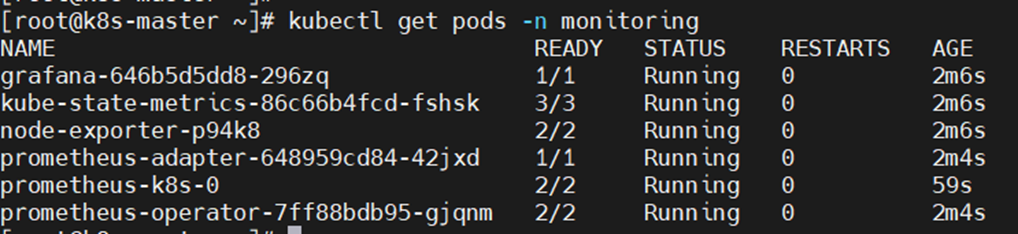
# 설치 확인 ([root@k8s-master]#)
kubectl get pods -n monitoring
3) Loki-Stack 설치
# 설치 – monitoring director에서 진행 ([root@k8s-master monitoring]#)
kubectl apply -f ground/k8s-1.27/loki-stack-2.6.1
# 설치 확인
kubectl get pods -n loki-stack

4) Grafana 접속
▶ 접속 URL : http://192.168.56.30:30001
▶ 로그인 : id: admin, pw: admin
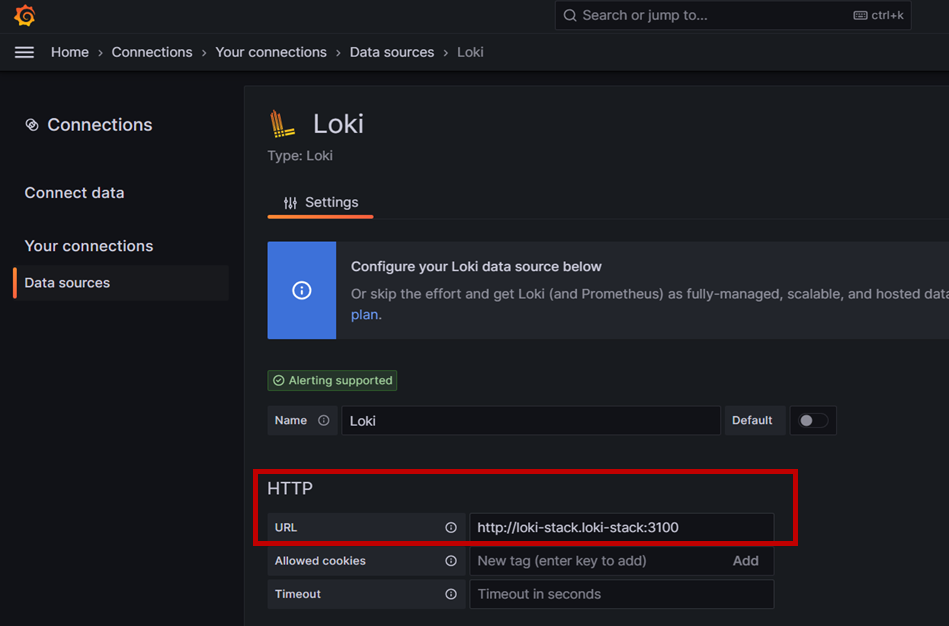
5) Grafana에서 Loki-Stack 연결
▶ Connect data : Home > Connections > Connect data
▶ 검색에 [loki] 입력 후 항목 클릭
6) Grafana 대시보드 생성
- 메뉴 이동: Grafana 좌측 메뉴에서 Dashboards > New > Import를 클릭
- ID 입력: 아래의 공식 ID를 입력하고 Load
> Prometheus (K8S 상태): 315 (Kubernetes Cluster 모니터링 표준)
> Loki (로그 확인): 15141 (Loki용 공식 로그 대시보드)

※ 모니터링 설치 삭제 시
- Prometheus(with Grafana), Loki-stack 삭제
▶ [k8s-master] Console 접속 후 아래 명령 실행
# 모니터링 설치 폴더로 이동
[root@k8s-master ~]# cd monitoring
# Prometheus 삭제
kubectl delete --ignore-not-found=true -f ground/k8s-1.27/prometheus-2.44.0/manifests -f ground/k8s-1.27/prometheus-2.44.0/manifests/setup
# Loki-stack 삭제
kubectl delete -f ground/k8s-1.27/loki-stack-2.6.1
- TODO : 1. 설치 yml 별도로 생성하여 진행하기 / 2. VM 재기동시 이력이 초기화 되지 않도록 스토리지 설정하기
'Cloud & Infra > K8S' 카테고리의 다른 글
| [K8S] K8S object 이해 (0) | 2026.03.16 |
|---|---|
| [K8S] App 배포 및 주요기능(Routing, AutoScaling 등) Test (0) | 2026.03.16 |
| [K8S] K8S 구성요소(컴포넌트)와 인터페이스 규격 (0) | 2026.03.10 |
| [K8S] 로컬에 K8S 환경 구축하기 (0) | 2026.03.10 |